Download Office 2024 LTSC Professional Plus (all languages)
Updated 2026-11-04
Office LTSC Professional Plus 2024 isn't sold as a normal download in the Microsoft Store. Our one-click installer takes care of it: it fetches Microsoft's official installer and downloads Office directly from Microsoft's servers in the language you choose.
Before you start
- Windows 10 or Windows 11, about 4 GB of free disk space and an internet connection
- Uninstall any older Office version and restart your PC – see keymart.net/help/remove-old-microsoft-office
- Your Office 2024 LTSC product key from your order email
Method 1: one-click installer for your language (recommended)
Choose your language. Pick 64-bit unless you know you need 32-bit (almost all PCs today are 64-bit).
| Language | 64-bit | 32-bit |
|---|---|---|
| English (US) | Download | Download |
| English (UK) | Download | Download |
| Français | Download | Download |
| Deutsch | Download | Download |
| Español | Download | Download |
| Italiano | Download | Download |
| Português (Portugal) | Download | Download |
| Português (Brasil) | Download | Download |
| Nederlands | Download | Download |
| العربية (Arabic) | Download | Download |
| Türkçe | Download | Download |
| Polski | Download | Download |
Step 1: run the installer
- Open the downloaded zip and extract it (right-click → Extract All). It contains 3 small files: install-office-2024.bat, config.xml and README.txt.
- Right-click install-office-2024.bat and choose “Run as administrator”. Click Yes when Windows asks.
- The installer downloads Microsoft's setup and Office starts installing. Microsoft's window says “Please stay online while Office downloads”.
Step 2: wait for the installation to finish
This takes a few minutes, depending on your internet speed. When Microsoft's window says “You're all set”, click Close.
Step 3: activate Office 2024 LTSC Pro Plus
- Open any Office app, for example Word (Start → All apps → Word).
- A window asks you to accept the licence agreement: click Accept, then Close.
- Click Account at the bottom left.
- On the right, click “Change Product Key”.
- Enter the product key from your order email and click “Activate Office”.
- When Office says it has been updated, close and reopen the Office app.
- Go back to Account: it now shows “Product Activated – Microsoft Office LTSC Professional Plus 2024”.
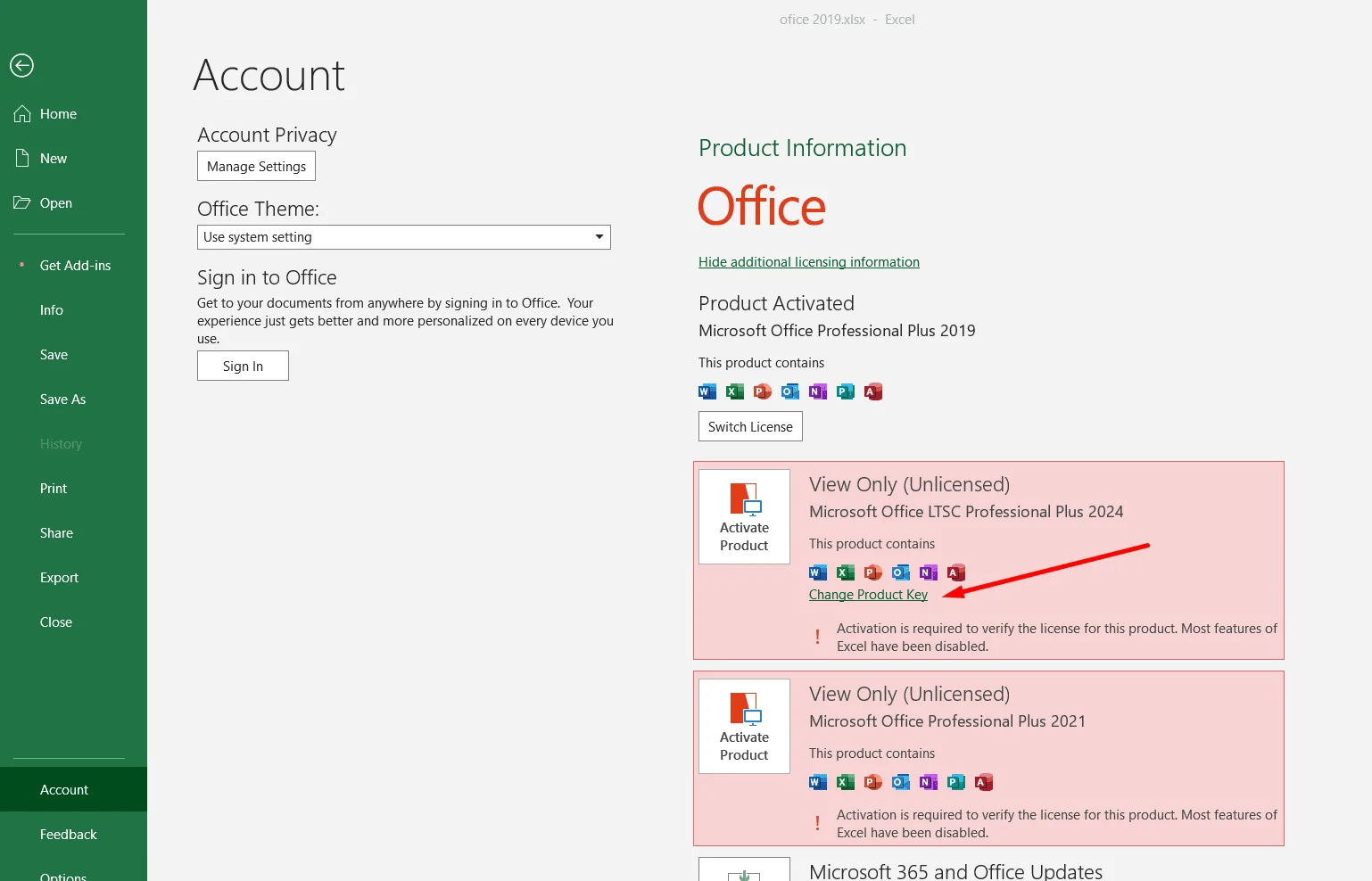
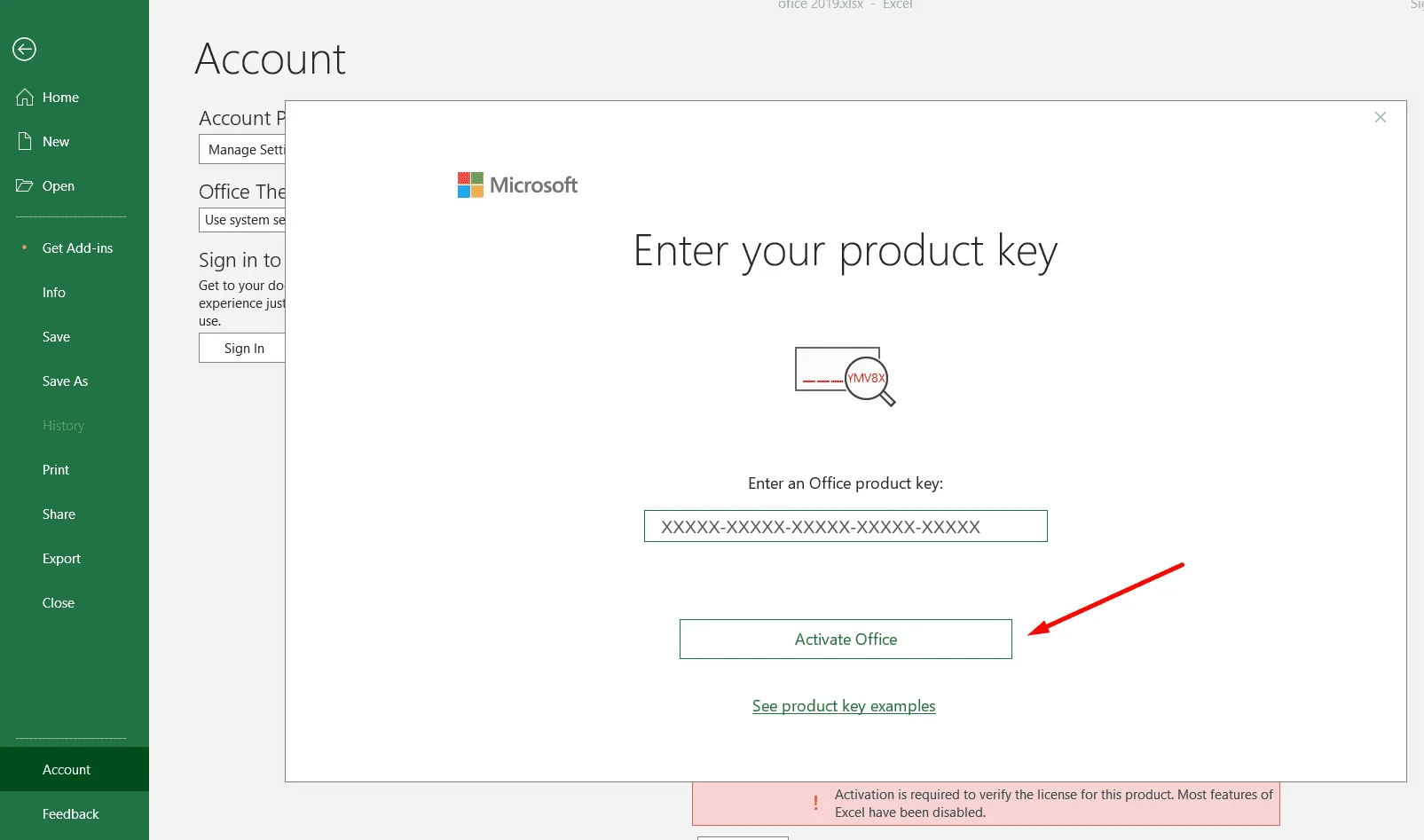
More screenshots of the activation: keymart.net/help/change-office-2024-product-key
Step 4: start using Office
That's it – Word, Excel, PowerPoint, Outlook, OneNote and Access are ready to use.
Method 2: build your own setup with Microsoft's tools
Prefer to do it by hand, or need several languages at once? Use Microsoft's Office Deployment Tool (www.microsoft.com/en-us/download/details.aspx?id=49117) with a configuration file from the Office Customization Tool (config.office.com – choose “Office LTSC Professional Plus 2024 – Volume License”). Our step-by-step guide explains every command: keymart.net/help/install-office-2024-ltsc